Best Practices & Tips
Getting Quonfig installed is great, but there are some Tips & Best Practices that will help you get the most out of your Quonfig experience.
Improve your contexts
We use Context to tell Quonfig the current state of the world so it can run the rules engine and give you the right values. One of the most common things we see is people setting only very basic context.
Use PermanentKeys, Not Anonymous
- Barebones
- Prefer: Use the 'key' attribute
 {
  user: {id: 123}
 }
 // and
 {
  user: {anonymous: true}  // no way to target / debug this particular anonymous user
 }
 {
  user: {key: "4f4b2b2b-2b2b-2b2b-2b2b-2b2b2b2b2b2b",
         id: 123,
  }
 }
  // and
 {
  user: {key: "2e2b2b2b-2b2b-2b2b-2b2b-2b2b2b2b2b2b"} // a permanent key for an anonymous user allows us to target / debug this user
 }
Use Names
key is the special attribute that Quonfig uses to determine the canonical identifier for a context. It's used for things like debugging, logging, and matching context across requests. That's great, but GUIDs aren't very easy on the eyes. Use the name attribute and Quonfig will use that in the UI instead of the key.
- Barebones
- Prefer: Add a name
 {
  user: {key: "2e2b2b2b-2b2b-2b2b-2b2b-2b2b2b2b2b2b"}
 }
 {
  user: {key: "2e2b2b2b-2b2b-2b2b-2b2b-2b2b2b2b2b2b",
         name: "Jamie Rivers" // UI will use this name in the Context & Debugger UIs
        }
 }
Use Multi-Context
Some feature flag tools only allow a single set of attributes / properties to be set for a context. Quonfig allows you to set multiple contexts for a single request. This is great for things like user context and team context, and helps when you want to target other things like a deployment or request. If you set a key we'll use that as the canonical identifier for the context. If you don't want the context to be indexed, just don't set the key.
- Team jammed into the user context
- Prefer: Separate out the team so it can have its own name
 {
  user: {key: "user-123",
         name: "Jamie Rivers",
         team_id: "team-456"
  }
 }
 {
  user: {key: "user-123",
         name: "Jamie Rivers",
  },
  team: {key: "team-456",
         name: "Acme Corp",
  },
  request: {
    path: "/dashboard/profile"
  }
 }
Try the Context Playground
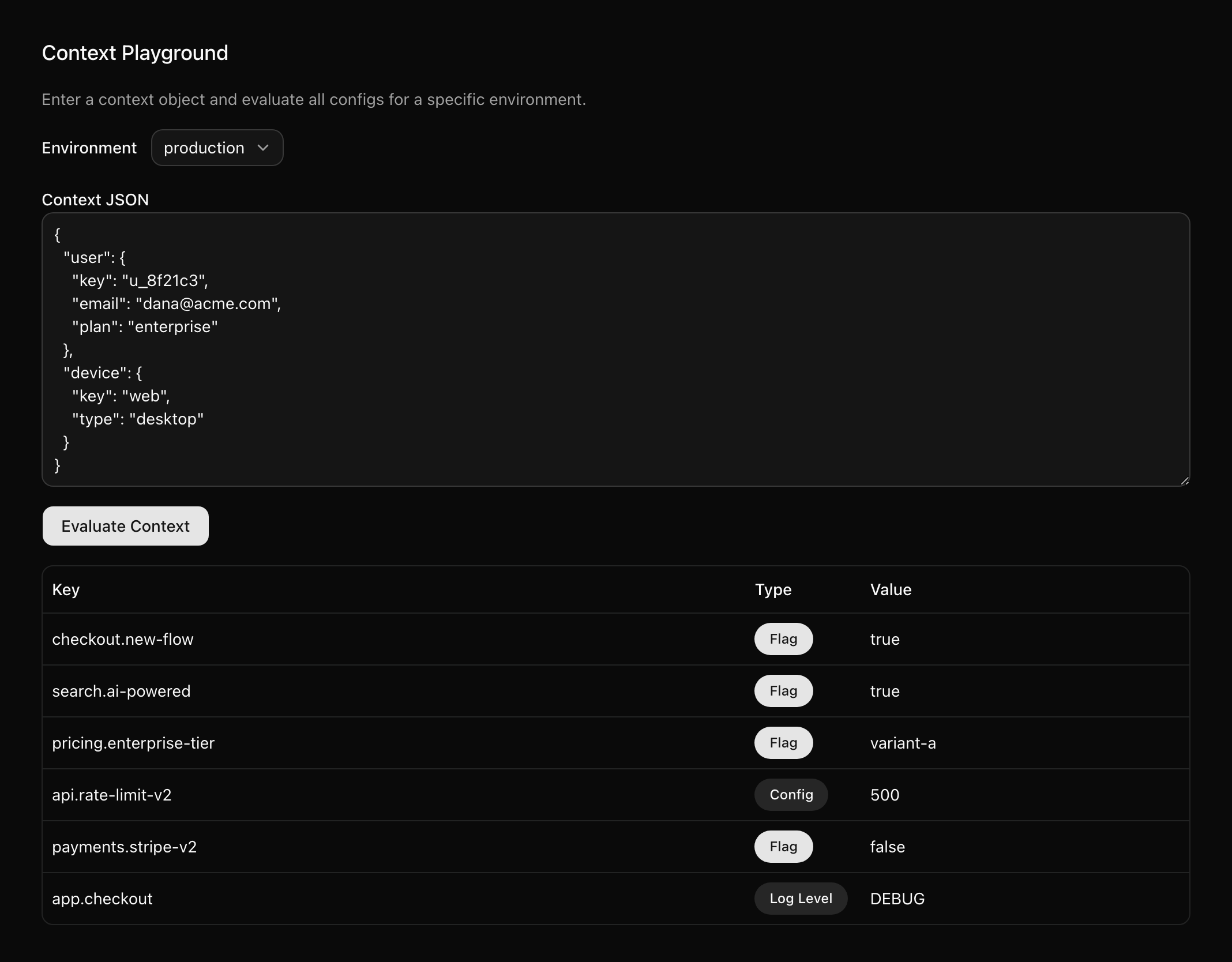
Is a flag not evaluating the way you expect? We've got tools to help.
Some users miss the Context Playground & Debugger tools that Quonfig provides to help you understand how Contexts work and how they're used in your application.
These tools let you see the live contexts that are being used in your application, which can help you understand why a flag is or isn't evaluating the way you expect. Pick a context and the Playground shows what every flag and config evaluates to for it.
Configs vs Flags
Quonfig has both flags and configs. They have the same targeting, types and environments; what differs is lifetime. Flags are ephemeral and head toward cleanup, while configs are permanent. See Feature Flag or Config? for how to decide, and how each one is tracked.
Explore Advanced Datatypes
Duration
Ever written http.connect(timeout: Quonfig.get("my.timeout')) and been worried that someone might use millisecond or seconds or minutes? Naming all your time duration configs kafka.retry.timeout-in-seconds to try to be really explicit? We've got a better way!
Duration is a type of config that you can specify in whatever units you like. Each SDK hands it back in an explicit unit: a java.time.Duration in Java, milliseconds in Node and Ruby. Under the covers it's stored as an ISO 8601 duration such as PT30S, PT5M, PT1H30M or P1DT6H: optional days, then T and hours, minutes and seconds; only seconds may have a fraction.
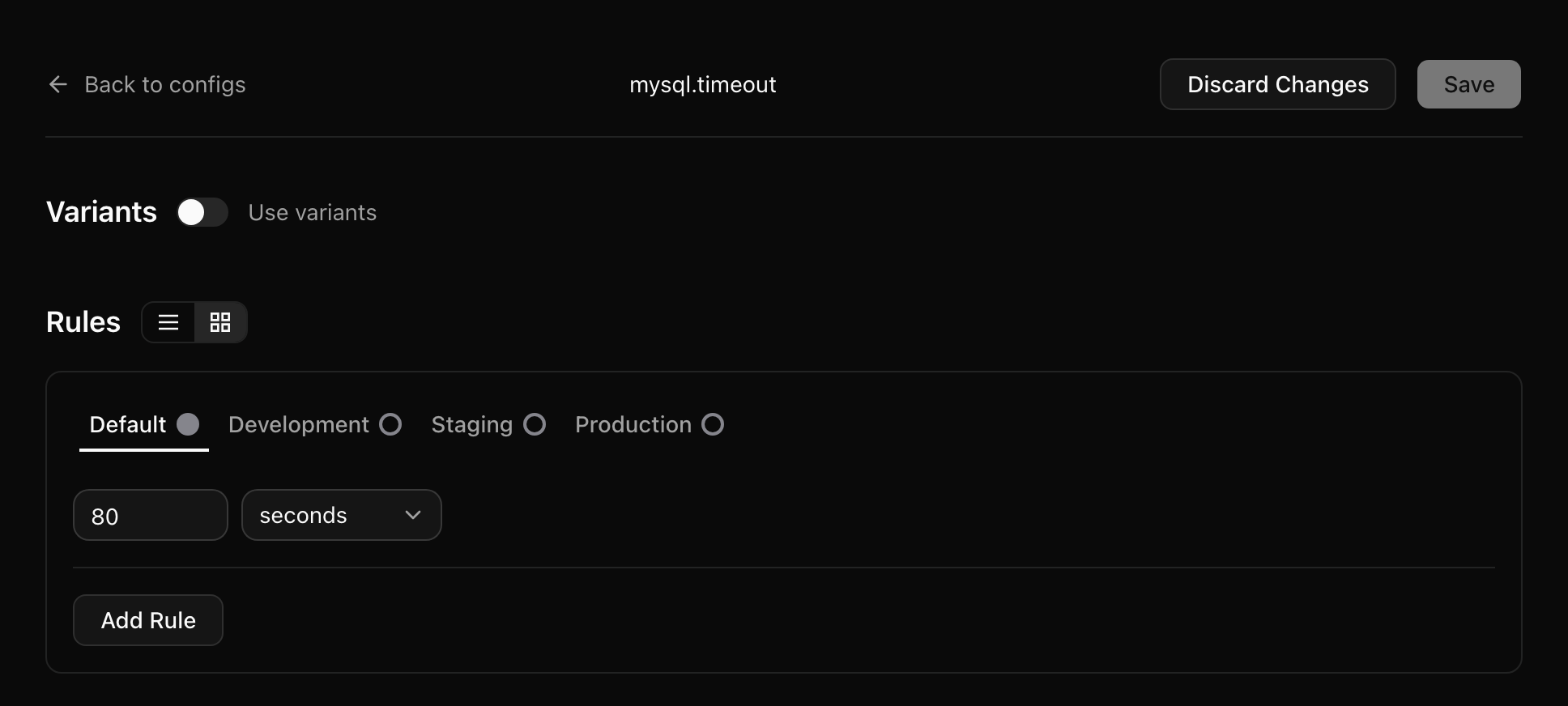
Then you can use it in code without guessing at units
- Java
- Node
- Ruby
Duration timeout = quonfig.getDuration("mysql.timeout", Duration.ofSeconds(10)); // a java.time.Duration

timeout.toMillis();  // 80000
timeout.toSeconds(); // 80
const timeoutMs = quonfig.getDuration("mysql.timeout", undefined, 10_000); // milliseconds

mysql.connect({ timeout: timeoutMs }); // 80000
timeout_ms = Quonfig.instance.get_duration("mysql.timeout", default: 10_000) # integer milliseconds

mysql.connect(timeout: timeout_ms) # 80000
JSON
Sometimes your config is more complex than a simple string or number. You might have a JSON object that you want to store in Quonfig. That's where the JSON datatype comes in. Quonfig will store it as a JSON object and you can retrieve it as a JSON object.
Once a JSON config has a shape your code depends on, give it a schema. See Use schemas for JSON configs below.
Slack Integration
An easy way to get more out of your Quonfig experience is to setup the Slack Integration. It's a great way to get notifications when things are changed and see how your team is using Quonfig.
Cron Job Contexts
If you've got feature flags going you've likely solved how to set the context for web requests. This happens in things like an around_action that sets the context for each web request. Cron jobs are a bit different, but the same concept applies. If we have a cron job that loops over every team and processes them, we can set the context for that processing with Quonfig.with_context. In Ruby this might look like this:
class CronJob
  LOG = SemanticLogger[self]

  def self.run_all
    Team.find_each do |team|
      Quonfig.with_context(team: {key: team.id.to_s, name: team.name}) do |quonfig|
        LOG.tagged(team_id: team.id) do
          ProcessTeam.new(team, quonfig).process
        end
      end
    end
  end
end

class ProcessTeam
  def initialize(team, quonfig)
    @team = team
    @quonfig = quonfig
  end

  def process
    return unless @quonfig.enabled?("reports.nightly-rollup")
    # ...
  end
end
with_context yields a client bound to that team's context. Evaluate through the yielded client (here, quonfig) so the team context applies; a plain Quonfig.get inside the block doesn't see it.
With this example, we'll get 2 big benefits:
- We'll be able to use feature flags to control how each team is processed.
- We'll have great logs showing us which team was processed and when.
Get yourself a Firealarm
You know the feeling when something is wrong and you'd like to let users know that you're aware of the issue? A quick and easy way to do this is to setup a Firealarm. In its simplest form, it's just a Quonfig Config that you can use to display a message to users. Add something like this:
<% if (msg = Quonfig.get("callouts.firealarm", "")).present? %>
  <div class="firealarm">
    <%= msg %>
  </div>
<% end %>
The "" default keeps the page rendering when the config doesn't exist, and .present? hides the banner when the value is blank. Now you can set the callouts.firealarm string to We're currently performing routine system maintenance. Some reports may not populate or update immediately during this time. to display the message to users.
We're currently performing routine system maintenance. Some reports may not populate or update immediately during this time.
Advanced Firealarms
If you'd like more control over the appearance of the firealarm, you might like a JSON datatype. This will give you a little more flexibility over the look and feel of the firealarm.
Create callouts.firealarm as a config with the JSON datatype. Here the default is an empty message, and Production overrides it while maintenance is running:
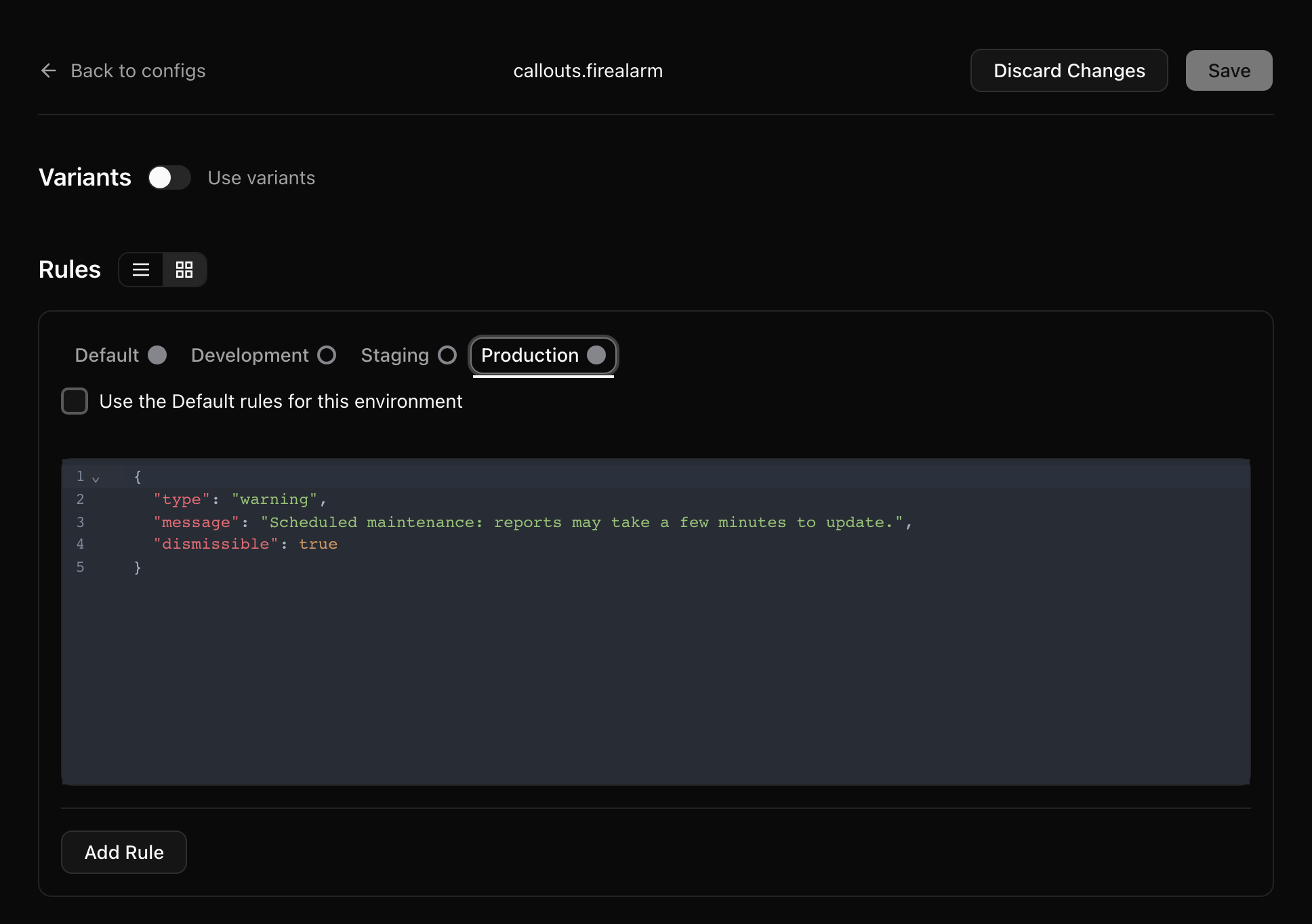
If the banner renders in the browser, turn on Send to Client SDK in the config's Settings so frontend SDKs receive it:

Then a bit of code to set the callout's class based on the type, and to hide it when there's no message. As before, the {} default keeps the page rendering when the config doesn't exist.
<% alarm = Quonfig.get("callouts.firealarm", {}) %>
<% if alarm["message"].present? %>
  <div class="callout <%= alarm["type"] %>">
    <%= alarm["message"] %>
  </div>
<% end %>
With the Production value above, visitors see:
Scheduled maintenance: reports may take a few minutes to update.
Want more control? Set the current URL as Context to allow you to only show the firealarm on certain pages.
This config is also a good candidate for a schema: the code above breaks quietly if someone saves "kind" instead of "type", or a type your CSS doesn't know.
Use schemas for JSON configs
A JSON config accepts any JSON by default. A schema pins down its shape. Schemas are plain JSON Schema documents stored in your workspace, and a JSON config opts in by naming one in its schemaKey. Once a config is bound, Quonfig checks every value of it against the schema, and the app edits it through a form instead of raw JSON.
When to add a schema
Add one when:
- Code reads fields out of the JSON. If your code does
alarm["type"], a typo or missing field in the config is a runtime bug. A schema turns it into a rejected save. - People other than the author edit it. The form shows labels, descriptions, dropdowns for
enums and required markers, so someone in support or product can change the value safely. - Several configs share a shape. One schema can be bound to many configs, for example one
calloutschema for every banner. - You use the TypeScript SDKs.
qfg generateuses the schema to type the config in the generated client.
A free-form blob that only a human reads, or a config you're still prototyping, doesn't need one yet.
Schemas apply to configs with the JSON datatype only. Strings, numbers and the other types already have their own type checks.
Create the schema
Write the schema as a file. This is the callout schema for the firealarm above:
{
  "$schema": "https://json-schema.org/draft/2020-12/schema",
  "title": "Callout",
  "description": "A site-wide banner. Leave message empty to hide it.",
  "type": "object",
  "required": ["type", "message"],
  "additionalProperties": false,
  "properties": {
    "type": {
      "type": "string",
      "title": "Type",
      "enum": ["info", "warning", "alert"],
      "description": "Sets the banner's color"
    },
    "message": {
      "type": "string",
      "title": "Message",
      "maxLength": 280,
      "description": "Shown to every visitor while set"
    },
    "dismissible": {
      "type": "boolean",
      "title": "Dismissible",
      "description": "Let visitors close the banner"
    }
  }
}
Then save it to your workspace with qfg schema. Pass @ and a path to read the file, or pass the JSON inline:
# from a file
qfg schema callout --set-json-schema=@schemas/callout.json

# inline
qfg schema callout --set-json-schema='{"type":"object","properties":{"message":{"type":"string"}},"required":["message"],"additionalProperties":false}'

# print what's stored
qfg schema callout --get
--set-json-schema creates the schema if the key is new and replaces it if it exists. --set-zod is a deprecated alias for it; it takes JSON Schema, not Zod.
You can also create one in the app under Schemas → + Add Schema. The schema page lists every config bound to it:
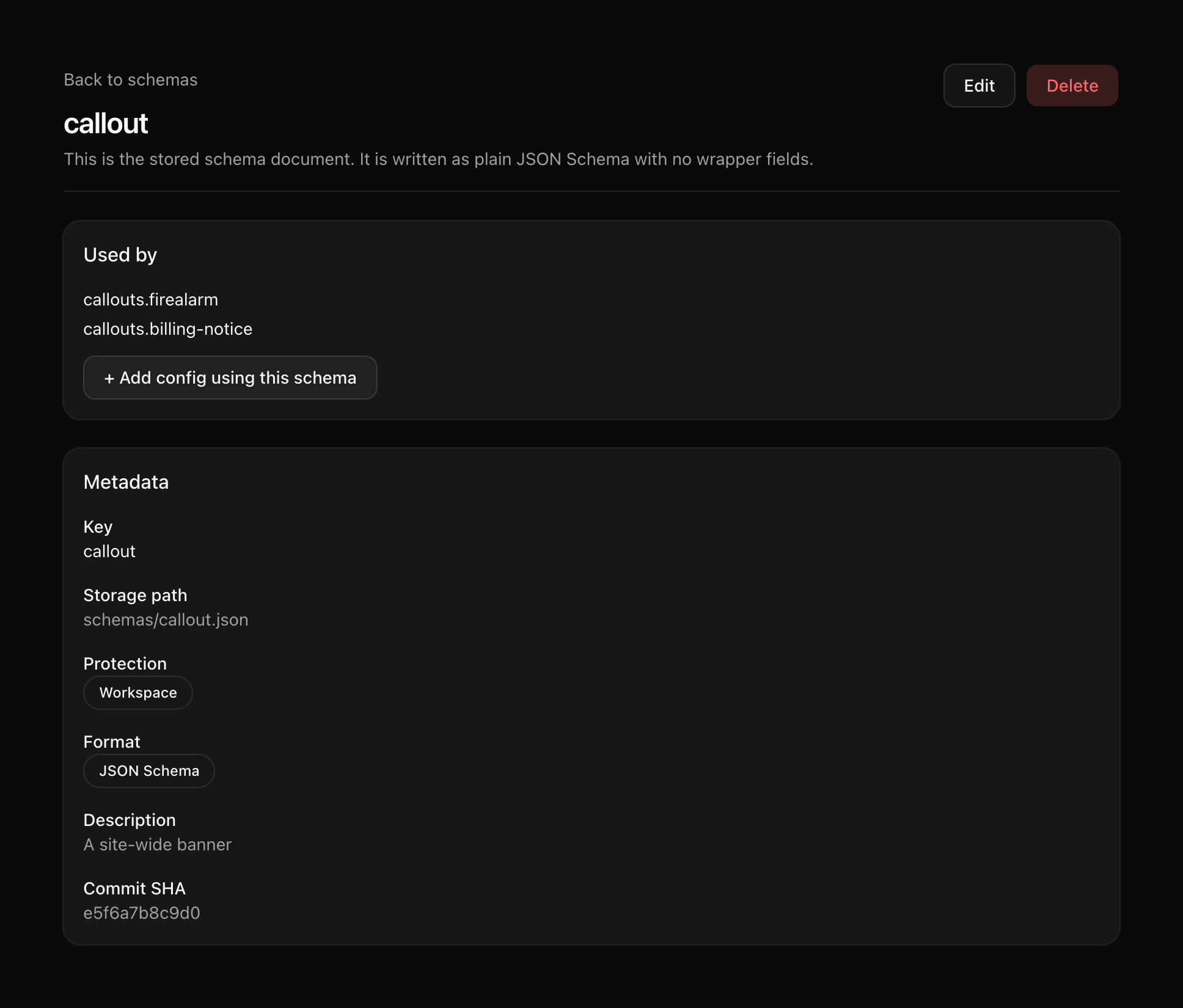
A few rules the app enforces when you save a schema:
- Every object that lists
propertiesmust set"additionalProperties": false, so a misspelled field is an error instead of being silently kept. - The schema must compile. Quonfig supports JSON Schema draft 2020-12 (the default) and draft-07.
Protected schemas
--protected stores the schema as protected, so only people with protected edit access can change it. Use it for schemas that guard sensitive configs.
Updating a protected schema without --protected leaves it protected. To make it unprotected, pass --no-protected; that needs protected edit access. Before qfg 0.10.0, an update without --protected made the schema unprotected, so on an older version pass it every time.
qfg schema billing.plan-limits --set-json-schema=@schemas/billing.plan-limits.json --protected
Bind a config to the schema
In the app, open the config's Settings and pick the schema under Schema binding. From the schema's page, + Add config using this schema creates a new config that's already bound.

In a config file, set schemaKey next to valueType:
{
  "key": "callouts.firealarm",
  "type": "config",
  "valueType": "json",
  "schemaKey": "callout",
  ...
}
Over the REST API or the MCP server, create the config first, then set schemaKey by writing the whole document.
What you get
In the app, a bound config edits through a form built from the schema, with a Raw JSON tab beside it. Titles and descriptions become labels and help text, enums become dropdowns, and required fields are marked. While any value breaks the schema, Save stays disabled and the form shows what's wrong.
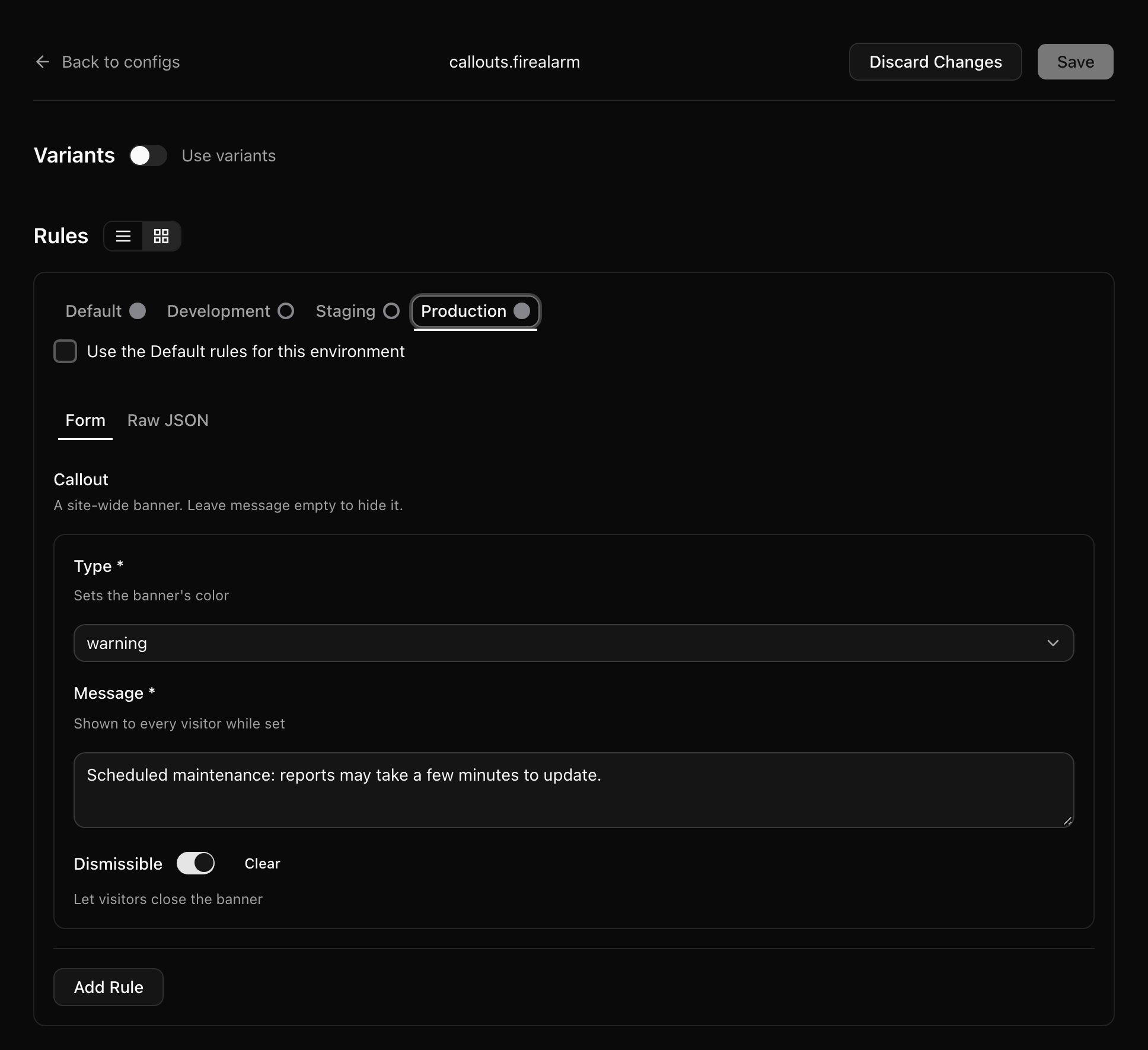
The form covers strings, numbers, integers, booleans, enum and const, nested objects, lists, maps (additionalProperties with a schema) and tagged oneOf. Schemas that use anyOf, allOf, not, if/then/else, patternProperties or an untagged oneOf still validate, but the config edits as raw JSON.
On every write, Quonfig validates each JSON value of the config against the schema: the default rules, every environment's rules, and variants. That covers saves in the app, the REST API and the MCP server. A bad value is rejected with a SCHEMA_VIOLATION error that names the path and the problem.
In git, qfg verify runs the same checks offline, and qfg push runs them before it pushes. The server runs them again on every push to your workspace and rejects the push if anything fails:
Value does not match schema "callout": ...when a value breaks the schemaReferences schema "callout" which does not existwhenschemaKeynames a missing schemaschema callout is invalid: ...when the schema itself doesn't compile
Schemas are checked when configs are written, not when they're read. The SDKs return the stored value as-is, so keep the defaults in your code sensible too.
Evolve a schema without breaking configs
Quonfig refuses a schema change that would make any value of a bound config invalid. The error lists each config that would break and why:
Schema callout would make 1 bound config invalid: callouts.firealarm (...)
That shapes how you change a schema:
- Additive changes are safe. Adding an optional property, adding a value to an
enum, or raising amaxLengthkeeps every existing value valid, so the update goes through. Ship the code that understands the new field before you start setting it. - Tightening needs the values fixed first. To make a field required or drop an
enumvalue, update every bound config so it already satisfies the new rule, then update the schema. - For a breaking change, clone it. Save the new shape under a new key (for example
callout-v2), move configs to it one at a time along with the code that reads them, then delete the old schema. - Unbind before you delete. A config whose
schemaKeynames a deleted schema failsqfg verifyand server-side push checks. Check the schema's page for configs that still use it first.