Feature Flag or Config?
The line between a feature flag and a config is fuzzy, and we've thought about it a lot. Some flags turn out to be permanent. Some configs get used like flags. Plenty of teams end up with a "flags" table full of things that were never going to be removed.
Our position is simple:
- Flags and configs have the same capabilities. Same targeting, same types, same environments, same audit trail.
- What separates them is lifetime. A flag is meant to go away. A config is meant to stay.
- Because the lifetimes differ, they're tracked differently. A flag should be heading toward cleanup. A config shouldn't nag you.
Here's what that looks like in practice. Every flag shows where it is in its life and how long it's been there, next to two weeks of evaluation activity:
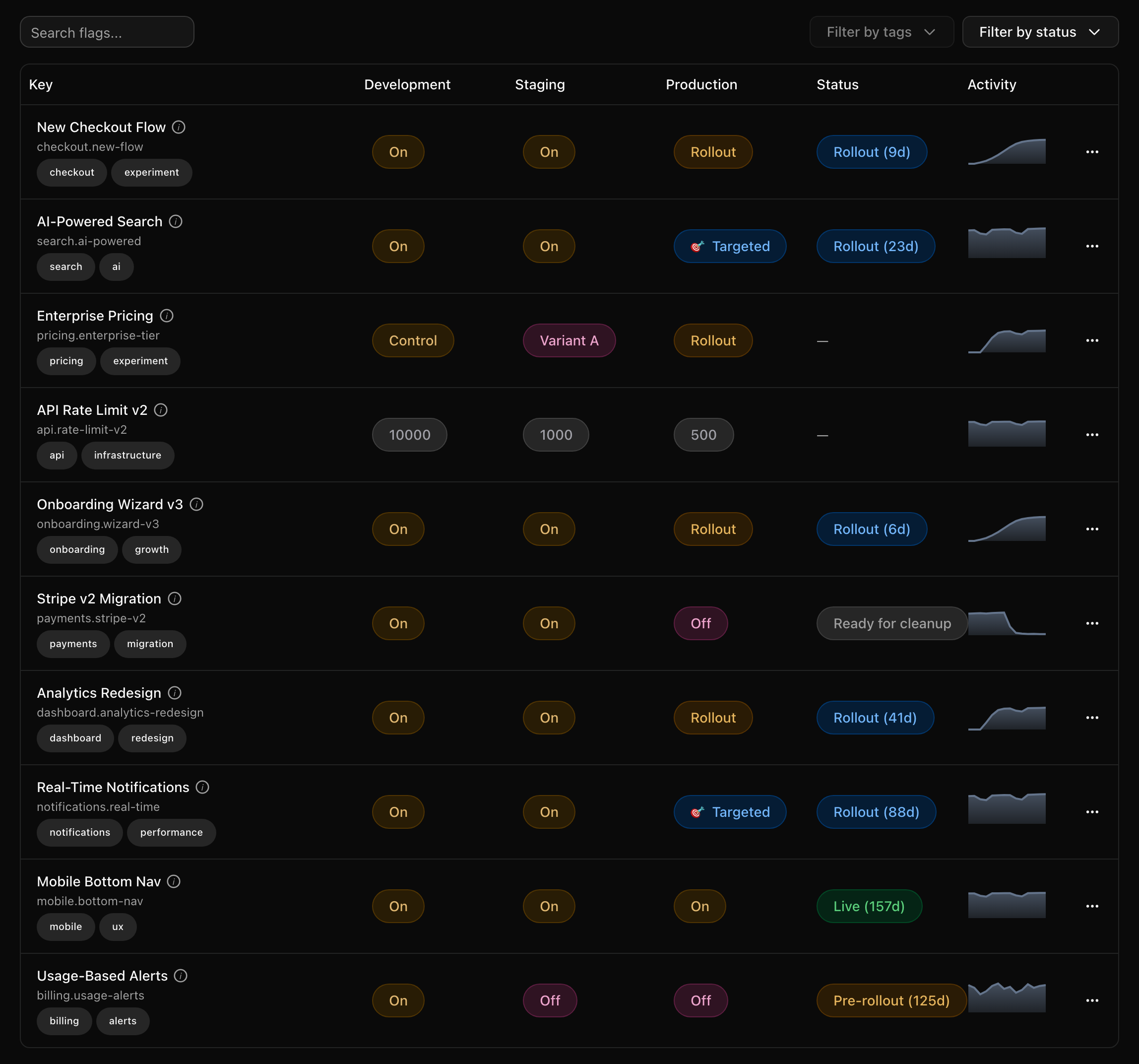
mobile.bottom-nav has been Live for 157 days, so its rollout is long
over and it should come out of the code. payments.stripe-v2 is already
marked Ready for cleanup, and its sparkline has dropped to zero because
the code that read it is gone. Configs don't get any of this, because a
timeout that hasn't changed in two years is just doing its job.
This page covers what the two have in common, where they differ, and how to decide which one you want.
What's the same
In Quonfig a flag and a config are the same kind of document. Each is a JSON file in your workspace's git repo, with a default and per-environment rules. Here's what both get:
- Targeting rules. Match on any context property, use segments, and do percentage rollouts.
- Per-environment values. Production, staging and development can each have their own rules, or inherit the default.
- Any value type. Boolean, string, integer, double, string list, JSON, and duration.
- Audit trail and git history. Who changed what, and when, for both.
- Evaluation telemetry. Both get evaluation counts and sparklines, so you can see whether something is still being read.
- Agent access. The MCP server and the CLI read and write both.
A flag doesn't have to be a boolean
This may be a hot take, but to us "flag" doesn't mean "boolean". Most flags are booleans, but a rollout of a new rate limit is just as temporary when its value is an integer. A new pricing page experiment can be a string variant. A migration can carry a JSON blob of settings, and a retry change can be a duration.
If the thing you're shipping is temporary and you want to target it, it's a flag, whatever its type.
What's different
| Feature flag | Config | |
|---|---|---|
| Expected lifetime | Ephemeral. It exists to ship something, then it goes away. | Permanent. It's part of how the system runs. |
| Frontend SDKs | Always sent to frontend SDKs. | Not sent to frontend SDKs unless you tick Send to frontend SDKs on that config. |
| Secrets and env vars | No | Can be provided by an environment variable or encrypted, so the value can stay confidential. |
| Lifecycle status | Pre-rollout, Rollout, Live, Ready for cleanup | None. A config that never changes is fine. |
| Cleanup | Marked ready for cleanup, then removed through a PR. | Deleted once no code reads it. |
Frontend and backend
A flag usually gates something a user can see, so the browser needs it too. That's why flags always go to frontend SDKs.
Configs are often things the browser should never see: database pool sizes, internal hostnames, API keys. So configs stay on the backend unless you opt one in. Some configs do belong in the frontend, such as a support email address, a list of supported locales, or a banner message. For those, tick Send to frontend SDKs on that config. See How Frontend SDKs Work.
Confidential configs
A config can be "provided by" an environment variable. Quonfig then stores
only a pointer that says "read my value from STRIPE_SECRET_KEY", and never
sees the value. A config can also be encrypted. Both let you put secrets
under the same rules and environments as everything else, without Quonfig
holding the plaintext. Flags don't need this, and it would be a strange
thing to roll out. See Secret Management.
How to decide
Ask yourself: should this exist in a year?
- No, it exists to ship something. It's a flag. That covers a new checkout flow, a migration to a new payment provider, a beta for one customer, or an A/B test.
- Yes, it's how the system runs. It's a config. That covers timeouts, rate limits, retry policies, plan limits, a list of allowed domains, or an encryption key.
- You don't know yet. Start with a flag. If it turns out to be permanent, convert it (see below). Defaulting to a flag means anything temporary still ends up in the cleanup flow.
Some things never make sense as ephemeral, even when you'd want to toggle them quickly:
- Operational kill switches and relief valves. "Turn off PDF export when the queue backs up" is meant to stay forever. Make it a config.
- Tuning values. Timeouts, batch sizes and concurrency limits change from time to time but never go away.
- Anything secret. Only configs can be provided by an env var or encrypted.
- Per-customer entitlements. "Acme gets 50 seats" is business data with a permanent home, not a launch.
When a flag turns out to be permanent
This happens all the time. You roll out a flag, users love it, and somebody says "actually, let's keep the ability to turn this off for enterprise accounts." Now the flag is a permanent part of the product.
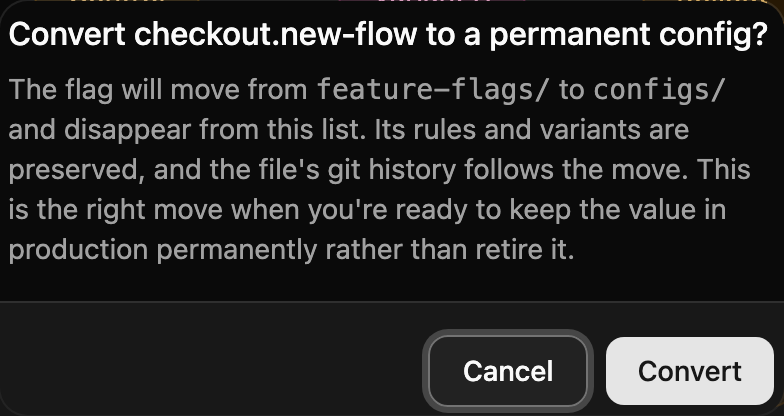
Don't leave it lingering in the flag list where it will keep looking stale. Use Convert to permanent config from the flag's row menu or its detail page:
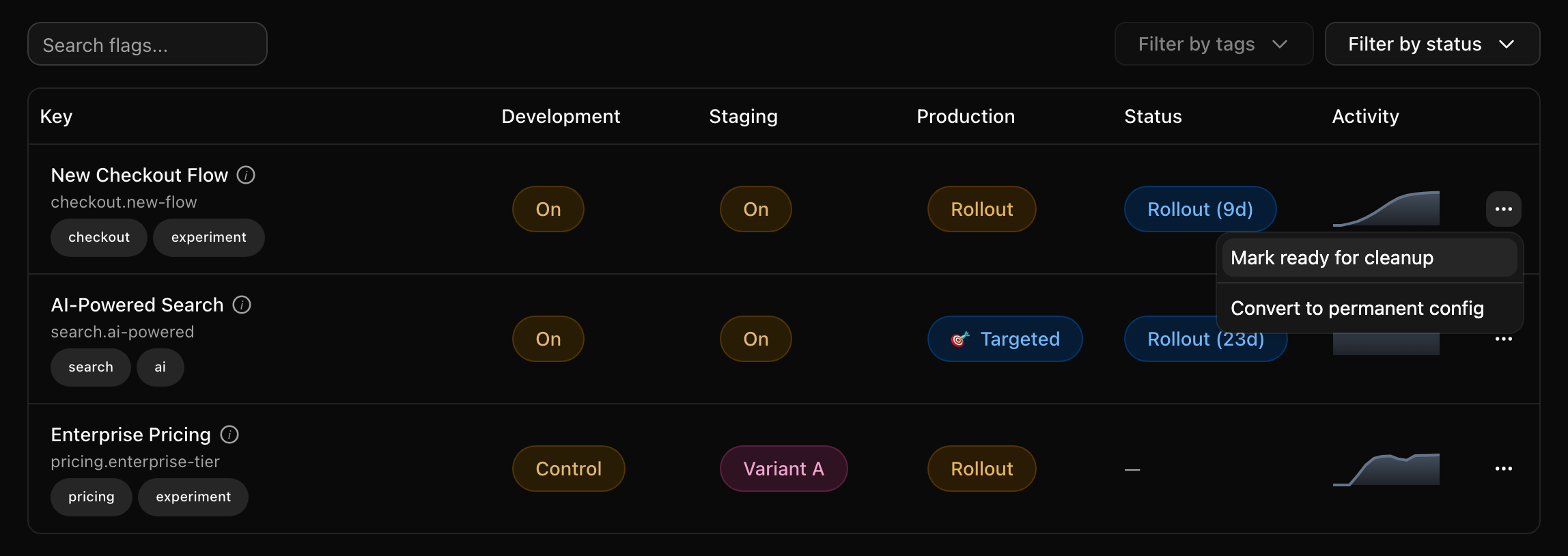
Quonfig moves the file from feature-flags/ to configs/. The rules and
variants stay the same and the git history follows the move. Your code keeps
reading the same key.
Tracking flags to cleanup
Creating a flag is easy; removing one is the hard part. A flag that outlives the project that created it tends to stay forever. So every boolean flag in Quonfig carries a lifecycle status, shown in the flag list (pictured at the top of this page) along with how many days the flag has held it. A flag that has been Live (157d) is telling you something.
The statuses are:
- Pre-rollout. Nobody in production gets the new behavior yet.
- Rollout. Some production traffic gets it, through a percentage or targeting rules. This is the "still in progress" state.
- Live. Everyone in production gets it. The rollout is complete, and the flag is now a cleanup candidate.
- Ready for cleanup. The flag's owner has said its job is done. You set this with Mark ready for cleanup.
Status comes from the stored rules, not from traffic, so it updates as soon as you change the rules. Today, lifecycle status and the ready-for-cleanup marker cover boolean flags.
From stale flag to deleted flag
The flow we recommend:
-
Find candidates. A flag that has been Live for a while, or one that is quiet, is probably done.
-
Mark it ready for cleanup. This is the owner saying "the rollout is over, take it out of the code."
-
Remove it from code in a PR.
qfg cleanup remove <key>writes a cleanup file and hands the removal to your coding agent through the Quonfig agent skill. The agent asks which value should win, inlines it, and deletes the dead branch. The change goes through code review like any other. -
Watch the sparkline flatline. Once that PR deploys, nothing reads the flag anymore and its activity drops to zero. In the list at the top of this page,
payments.stripe-v2is marked ready for cleanup and its sparkline has already fallen off. That's what "safe to delete" looks like. -
Delete the flag.
qfg cleanup verify <key>confirms there have been no evaluations recently. Chain it withqfg deleteso the delete only runs when it's safe:qfg cleanup verify payments.stripe-v2 && qfg delete payments.stripe-v2
Quiet doesn't prove a flag is unused. A code path that runs once a month, or
an SDK with telemetry turned off, can look quiet. Check the code before you
delete anything. qfg cleanup list --all lists every flag and config by how
recently it was evaluated. See cleanup list.
Let an agent run the cleanup
The best setup we've seen is to have an agent drive this loop for you. Our happiest customers connect Claude Tag to the Quonfig MCP server and ask questions like:
@Claude which flags have finished rolling out and haven't changed in 30 days?
@Claude list the flags marked ready for cleanup that still have evaluations
in production.
@Claude which flags and configs have had no evaluations in the last 60 days?
The MCP server gives the agent each flag's lifecycle status in every
environment, its last modified date and author, whether it's marked ready
for cleanup, and evaluation counts for the whole workspace in one call
(get_eval_activity).
That's enough for an agent to build a cleanup report tailored to your team:
who owns each stale flag, which ones are safe to remove, and which still
have traffic. From there, the same agent can open the removal PR with the
agent skill.
Configs stay out of this flow on purpose. A config that has held the same value for two years is doing its job.