Using Jev with Quonfig
Jev (the @typesafe-ai/sdk
package) takes a map of named questions. Each question is a yes/no (noul),
a score or a choice. That shape is the same for every Jev call, so one
JSON Schema covers all of them.
Paste the schema below into your workspace once. Keep each question set in a
JSON config bound to it, and pass config.questions to typesafe.systemOne.
You can change a question, add one or roll a new rubric out to part of your
traffic without a deploy.
The schema
Copy this schema as it is. It mirrors the Questions type of
@typesafe-ai/sdk 0.6.0.
{
  "$schema": "https://json-schema.org/draft/2020-12/schema",
  "title": "Jev questions",
  "description": "A set of named Jev questions in TypeSafe's request shape. Each name becomes a key in the answers object, so pick names your code can read, like is_urgent or frustration.",
  "type": "object",
  "required": [
    "questions"
  ],
  "additionalProperties": false,
  "properties": {
    "questions": {
      "type": "object",
      "title": "Questions",
      "description": "One entry per question. The name is the key Jev answers under; the value is what you ask.",
      "minProperties": 1,
      "propertyNames": {
        "pattern": "^[a-zA-Z][a-zA-Z0-9_]*$"
      },
      "additionalProperties": {
        "oneOf": [
          {
            "title": "Yes / No",
            "description": "Jev answers with a probability between 0 and 1 that the answer is yes.",
            "type": "object",
            "required": [
              "type",
              "instructions"
            ],
            "additionalProperties": false,
            "properties": {
              "type": {
                "const": "noul",
                "title": "Question type"
              },
              "instructions": {
                "type": "string",
                "title": "Question",
                "description": "Ask it as a yes / no question. Jev reads the state you pass alongside it.",
                "minLength": 1
              },
              "criteria": {
                "type": "object",
                "title": "What counts",
                "description": "Optional. Spell out what a yes and a no look like when the question alone could be read two ways.",
                "additionalProperties": false,
                "properties": {
                  "true": {
                    "type": "string",
                    "title": "Means yes",
                    "description": "Describe the situation that should count as yes."
                  },
                  "false": {
                    "type": "string",
                    "title": "Means no",
                    "description": "Describe the situation that should count as no."
                  }
                }
              }
            }
          },
          {
            "title": "Score",
            "description": "Jev answers with an expected score on the rubric: 0 is the first line, 1 the second, and so on. It can land between levels, so 1.5 means between the second and third line.",
            "type": "object",
            "required": [
              "type",
              "instructions",
              "criteria"
            ],
            "additionalProperties": false,
            "properties": {
              "type": {
                "const": "score",
                "title": "Question type"
              },
              "instructions": {
                "type": "string",
                "title": "Question",
                "description": "What is being rated. The rubric below defines the scale.",
                "minLength": 1
              },
              "criteria": {
                "title": "Rubric, lowest first",
                "description": "One line per level, lowest first. The first line is level 0, the second is level 1. At least two lines.",
                "type": "array",
                "minItems": 2,
                "items": {
                  "type": "string",
                  "title": "Level",
                  "description": "What this level looks like, in a sentence."
                }
              }
            }
          },
          {
            "title": "Choice",
            "description": "Jev picks exactly one of the labels and answers with its name.",
            "type": "object",
            "required": [
              "type",
              "instructions",
              "criteria"
            ],
            "additionalProperties": false,
            "properties": {
              "type": {
                "const": "choice",
                "title": "Question type"
              },
              "instructions": {
                "type": "string",
                "title": "Question",
                "description": "What to classify. The labels below are the only possible answers.",
                "minLength": 1
              },
              "criteria": {
                "title": "Labels",
                "description": "The label is the name Jev answers with; the text tells Jev when to pick it. At least two labels.",
                "type": "object",
                "minProperties": 2,
                "maxProperties": 255,
                "additionalProperties": {
                  "type": "string",
                  "title": "When to pick it",
                  "description": "Describe the case this label covers."
                }
              }
            }
          }
        ]
      }
    }
  }
}
What the schema enforces:
- Question names start with a letter and use only letters, digits and
_. There must be at least one question. typeisnoul,scoreorchoice, and each type allows only its own fields.- Every question has non-empty
instructions. Jev rejects a yes/no question that has neither instructions nor criteria, so the schema asks for the question text every time. - A
scorerubric is a list of at least two lines, lowest first. The first line is level 0, the second is level 1. Jev answers with an expected score, which can fall between levels:1.5means between the second and third line. - A
choicehas between 2 and 255 labels, each with a description.
Quonfig checks every value against the schema on every write: saves in the
app, the REST API, the MCP server,
qfg verify and qfg push (@quonfig/cli 0.2.0 or
later), and a plain git push to your workspace repo. A value that doesn't
match is rejected with the field that is wrong.
Set it up in the app
-
Add the schema. Go to Schemas, click + Add Schema, set the key to
jev-questionsand paste the schema.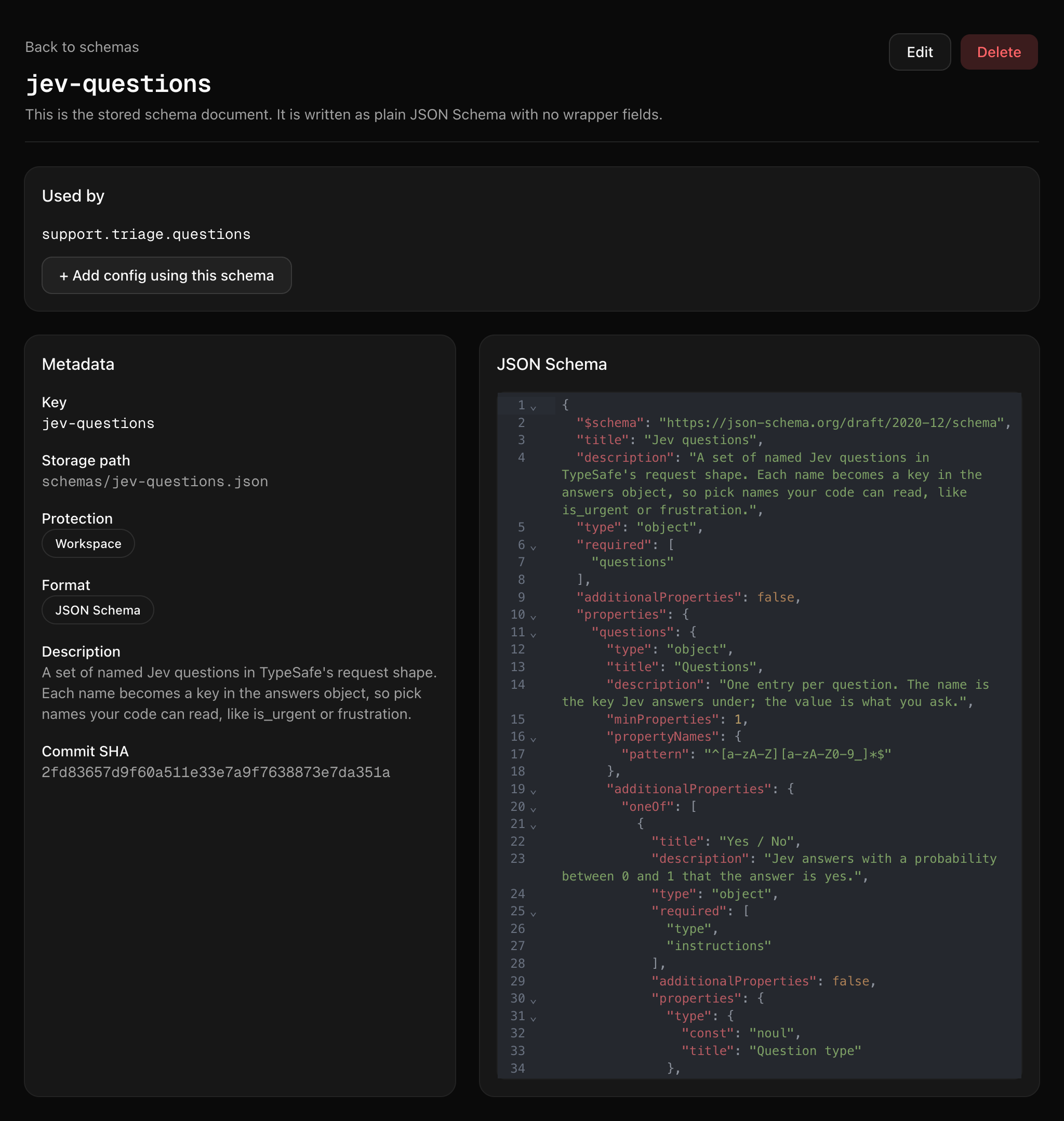
-
Create the config. On the schema's page, click + Add config using this schema. Name it
support.triage.questions. Or go to Configs, click + Add Config, choose thejsontype and pickjev-questionsas the schema. -
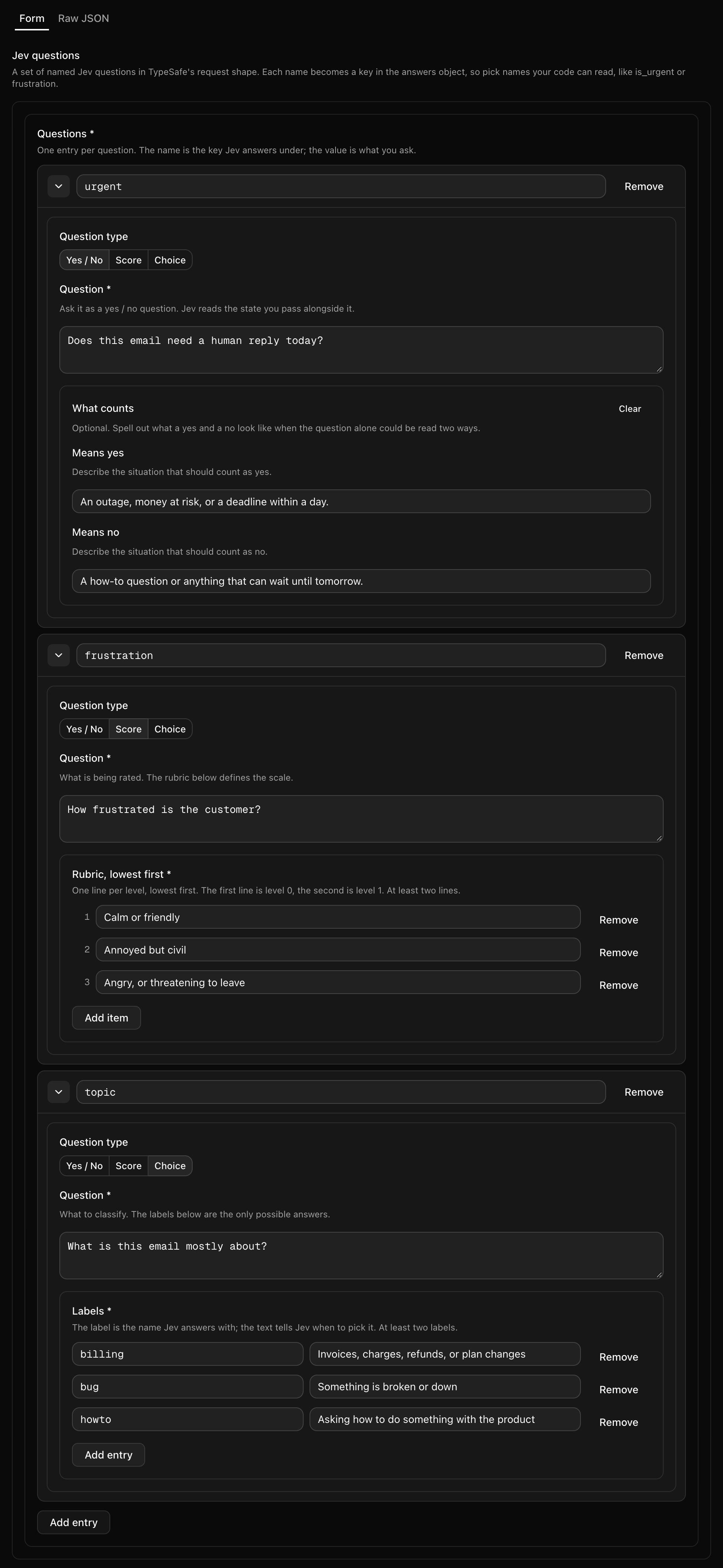
Write the questions in the form. The editor opens on the Form tab. Each question is a card. Pick its type with the Yes / No, Score or Choice switcher, then fill in the fields. The labels and hints on each field come from the schema, so the form asks for a rubric on a Score and for labels on a Choice. The form checks your value against the schema as you type. Switch to the Raw JSON tab to see or paste the whole value. See the example value below.
-
Pass the questions to Jev. Generate typed accessors and pass
questionsstraight totypesafe.systemOne. See the code.
When you save, running SDKs get the new questions over their live connection. In our test, a new question reached a running Node process about 12 seconds after Save, with no restart. Per-environment values and history work as they do for any other config.
Different questions per customer
Add a targeting rule to ask some customers more. For example:
- A rule on
customer.planis one ofenterprisegets its own question set with an extrachurn_riskquestion. - A rule on
customer.keyis one ofglobexgets its own set with alanguageChoice question, for a customer that writes in German.
The rule matches the context you pass in code (see the code). Rules are checked top to bottom and the first match wins. A customer that matches no rule gets the default.
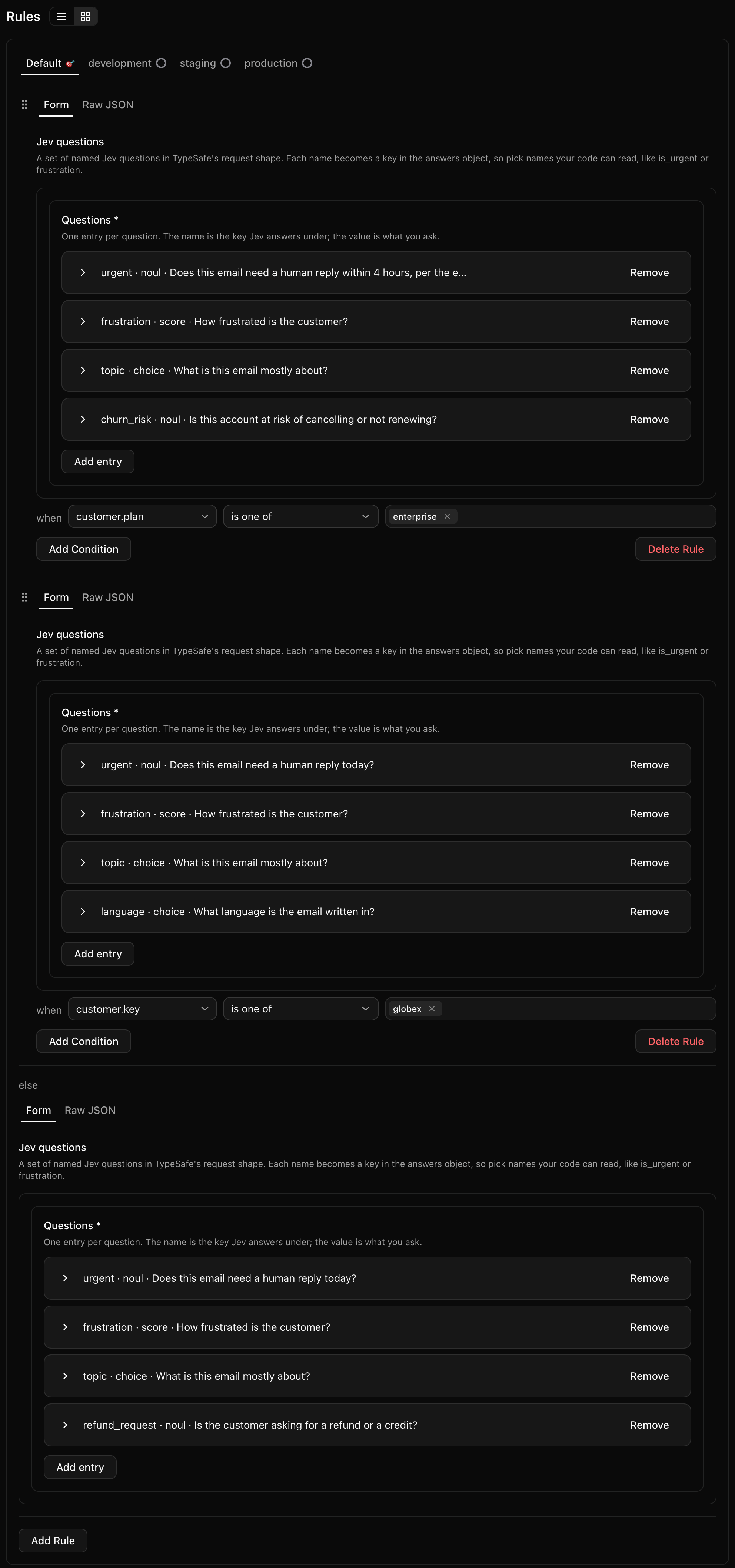
Each rule holds its own full question set. It is a complete copy, not a list of changes to the default. So when you add a question to the default, the rules do not get it. Add it to each rule's set too: edit it in the form, or paste the whole set in the Raw JSON tab.
Set it up with files (agents and git)
Write two files in your workspace directory, then check and push them:
qfg verify
qfg push
qfg verify catches the same mistakes the app does, before anything leaves
your machine.
The schema goes in schemas/jev-questions.json, as shown
above.
The config file
Each question set is one config with "schemaKey": "jev-questions". This one
asks three questions about every support email:
{
  "key": "support.triage.questions",
  "type": "config",
  "valueType": "json",
  "schemaKey": "jev-questions",
  "description": "What we ask Jev about every inbound support email.",
  "default": {
    "rules": [
      {
        "criteria": [{ "operator": "ALWAYS_TRUE" }],
        "value": {
          "type": "json",
          "value": {
            "questions": {
              "urgent": {
                "type": "noul",
                "instructions": "Does this email need a human reply today? The customer's plan is in the state.",
                "criteria": {
                  "true": "Outage, money at risk, or an explicit deadline.",
                  "false": "FYI, general question, or it can wait until tomorrow."
                }
              },
              "frustration": {
                "type": "score",
                "instructions": "How frustrated is the customer who wrote this email?",
                "criteria": ["Calm", "Annoyed but civil", "Angry or threatening to leave"]
              },
              "topic": {
                "type": "choice",
                "instructions": "What is this email mainly about?",
                "criteria": {
                  "billing": "Invoices, charges, refunds or plan changes.",
                  "bug": "Something in the product is broken or wrong.",
                  "howto": "A question about how to do something."
                }
              }
            }
          }
        }
      }
    ]
  },
  "environments": [],
  "variants": []
}
A rule for one plan
A targeting rule goes in the same
rules list, above the ALWAYS_TRUE default. Its value is a full question
set. This rule gives enterprise customers the three questions above plus
churn_risk. The three shared questions are cut here for space; in the file
they are written out in full.
{
  "criteria": [
    {
      "propertyName": "customer.plan",
      "operator": "PROP_IS_ONE_OF",
      "valueToMatch": { "type": "string_list", "value": ["enterprise"] }
    }
  ],
  "value": {
    "type": "json",
    "value": {
      "questions": {
        "churn_risk": {
          "type": "noul",
          "instructions": "Is this account at risk of cancelling or not renewing?"
        }
      }
    }
  }
}
The model name
Keep the model name in its own string config, jev.model. Then production
and staging can pin different models without copying the questions.
{
  "key": "jev.model",
  "type": "config",
  "valueType": "string",
  "description": "Which Jev model to call.",
  "default": {
    "rules": [
      {
        "criteria": [{ "operator": "ALWAYS_TRUE" }],
        "value": { "type": "string", "value": "jev-latest" }
      }
    ]
  },
  "environments": [],
  "variants": []
}
The code
Generate typed accessors for Node with
qfg generate:
qfg generate --targets node-ts
You need @quonfig/cli 0.2.0 or later. From that version, the generated type
for a jev-questions config is Jev's own question union, so questions
passes to systemOne with no cast.
import { Quonfig } from "@quonfig/node";
import { TypeSafeClient } from "@typesafe-ai/sdk";
import { QuonfigTypesafeNode } from "./generated/quonfig-server";

const client = new Quonfig({ sdkKey: process.env.QUONFIG_BACKEND_SDK_KEY! });
await client.init();
const quonfig = new QuonfigTypesafeNode(client);
const typesafe = new TypeSafeClient({ apiKey: process.env.TYPESAFE_API_KEY! });

export async function triage(email: string, customer: { key: string; plan: string; country: string }) {
  // Rules on customer.plan and customer.key match this context.
  const ctx = { customer };
  const { questions } = quonfig.supportTriageQuestions(ctx); // typed from the schema
  const { answers } = await typesafe.systemOne({
    state: { email, plan: customer.plan, country: customer.country },
    model: quonfig.jevModel(ctx),
    questions, // no cast
  });
  return answers;
}
answers has one entry per question, under the question's name. Each answer
is a union, so narrow on type before you read its value:
noul: the probability that the answer is yes, from 0 to 1.score: the expected level on the rubric. It is a number such as0.47or1.4, not a whole-number position, so compare it with a threshold (score >= 1.5) rather than an exact level.choice: the name of the label Jev picked.
In our test, an angry enterprise email about an outage got urgent 0.94,
churn_risk 0.95, frustration 2 and topic bug. A polite German billing
email from Globex got urgent 0.18, frustration 0.47, topic billing and
language de.
For SDK setup and options, see the Node SDK.